
Assistants, Workflows, and Agents: Designing for the Right Level of Autonomy
Reading order
Building AI Systems
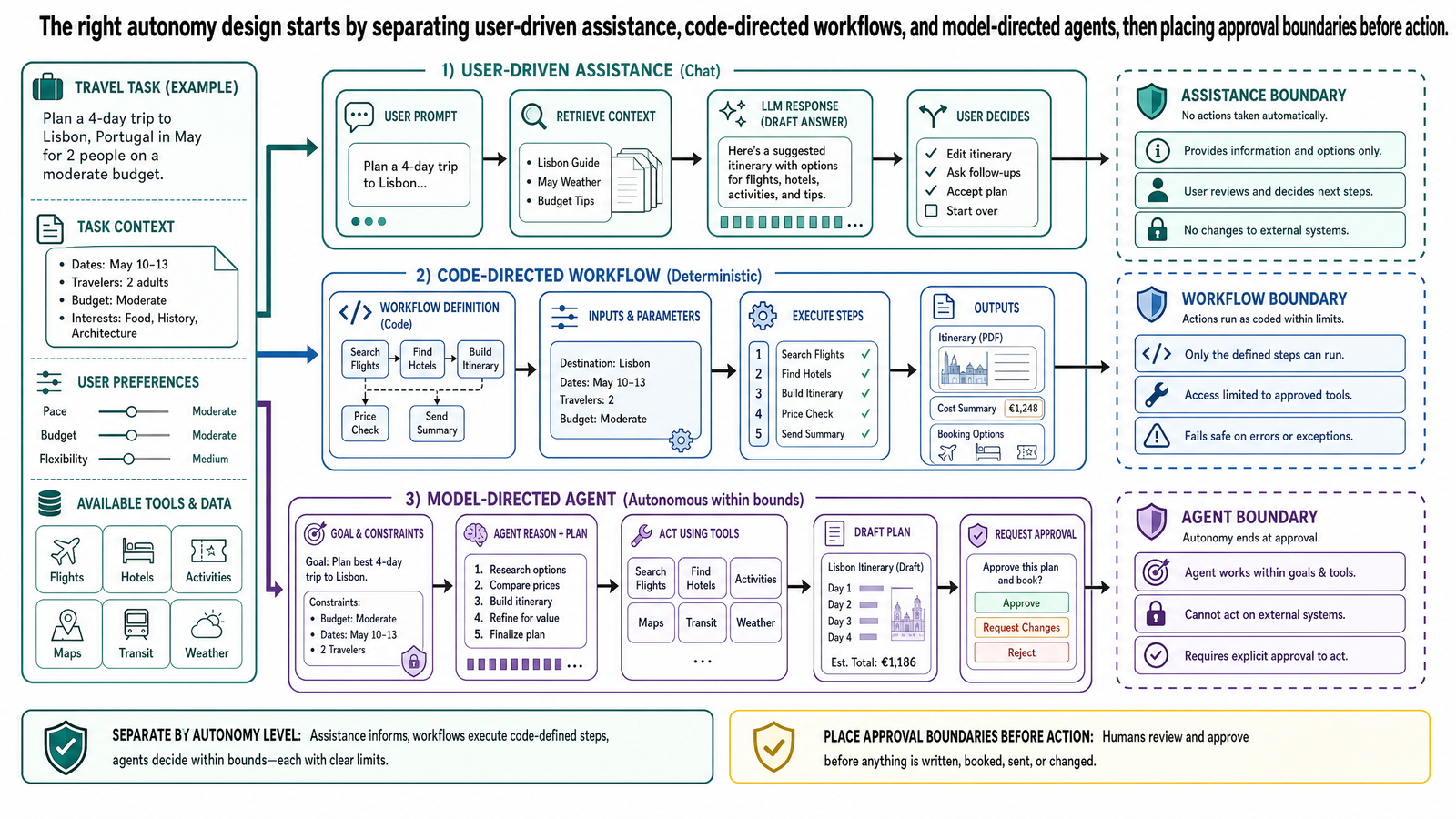
Table of Contents
- What This Post Is Not
- Why Agent Terminology Gets Confusing
- Assistants, Workflows, and Agents as Architectural Patterns
- Assistant
- Workflow
- Agent
- A More Useful Distinction: Fixed Process vs Model-Directed Process
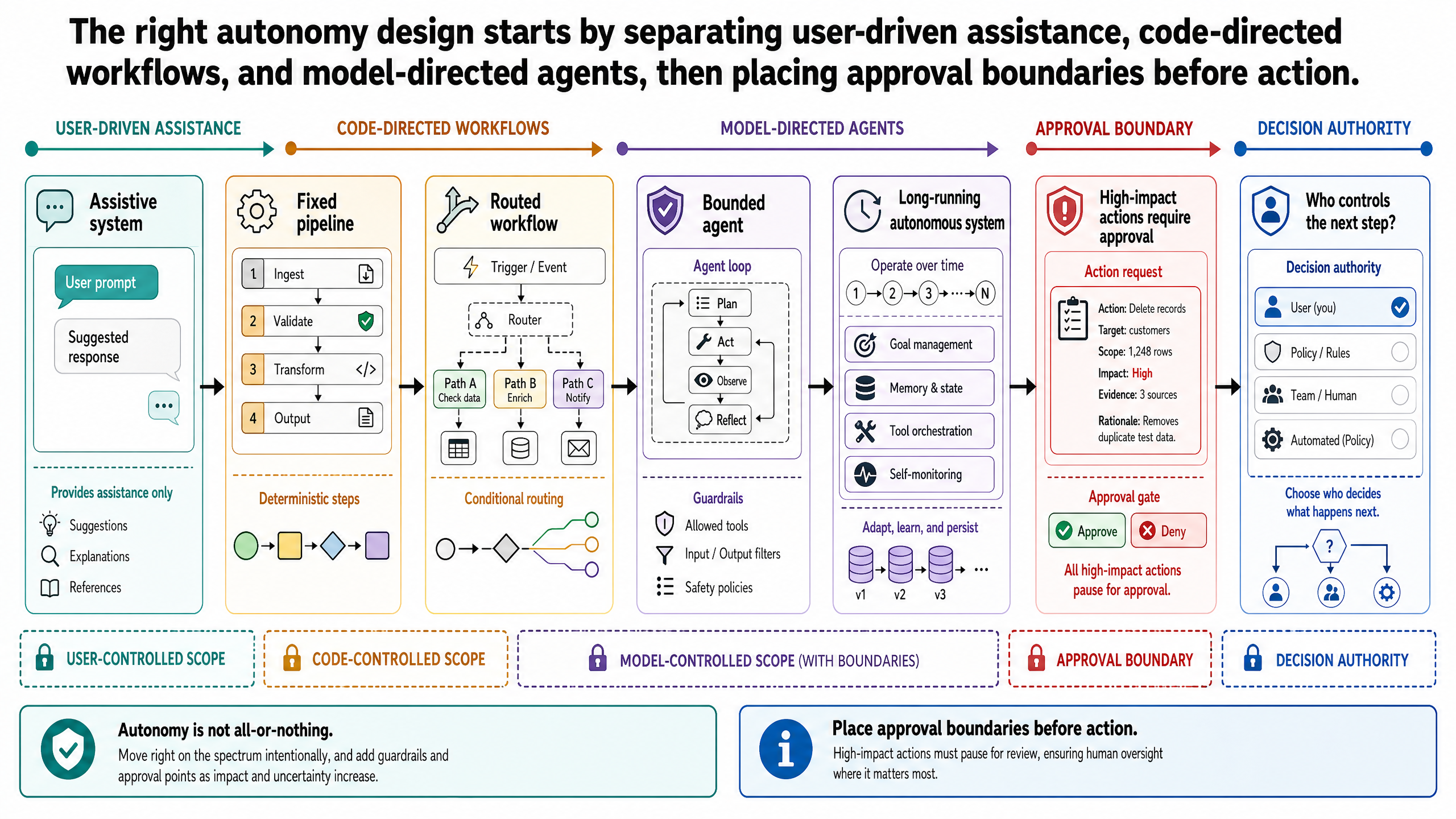
- Autonomy Is a Spectrum
- 1. Fixed Pipeline
- 2. Routed Workflow
- 3. Assistive System
- 4. Bounded Agent
- 5. Long-Running Autonomous System
- Approval Boundaries Matter More Than Branding
- Running Example: An OptiVerse Travel Copilot With Approval Gates
- Version 1: Assistive
- Version 2: Workflow
- Version 3: Bounded Agent
- When Not to Use an Agent
- Common Misconceptions
- The Real Design Question
- Bridge to Agent Loops in Practice
- Source Notes
Agent has become one of the most overloaded terms in AI. Product teams use it to describe everything from a chat interface with retrieval to a long-running process that can plan, call tools, and take actions on its own. That vocabulary drift creates a practical problem: teams start arguing about labels when the real design question is architectural.
For engineers and technical decision-makers, the useful question is not whether a system "is an agent." The useful question is: who controls the next step? In some systems, the next step is fixed in code. In others, the model can choose among tools, decide what information to gather next, and determine when to stop or escalate. Those are different control patterns, with different reliability, cost, and risk profiles.
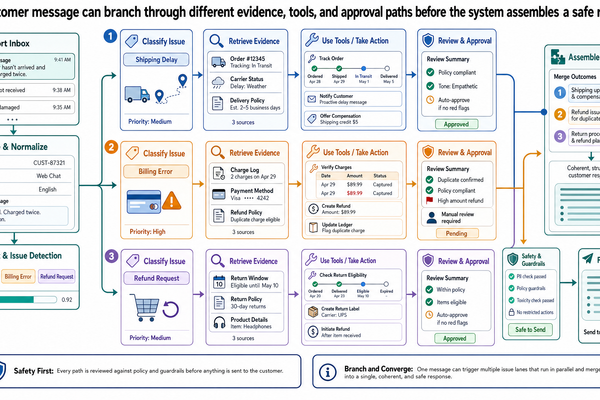
This is why the common assistant-versus-agent binary is too shallow. It collapses several distinct design decisions into a single marketing term. A better framing is to distinguish assistants, workflows, and agents as architectural patterns, then place them on an autonomy spectrum defined by permissions, approval boundaries, and stop conditions. The focus in this post is those control boundaries, not the runtime mechanics of loops. Those come next.
Post 4 separated four information layers: conversation memory, task state, working memory, and durable knowledge. That vocabulary matters here because autonomy design depends directly on what information the system can read, write, and treat as evidence. A system that collapses those layers will make poor autonomy decisions regardless of how it is labeled.
What This Post Is Not
This is not a post about runtime loop mechanics, tool contracts, or failure recovery. Those operational details belong to Post 6. It is also not a governance or auditability post; the full production standard for approval gates and replayable traces comes in Post 10. This post owns the conceptual framing: what autonomy means as a design spectrum and where approval boundaries should sit.
Why Agent Terminology Gets Confusing
Part of the confusion comes from mixing product language with system design language. Assistant is often a user-facing metaphor. It suggests a system that helps a person complete a task, usually through conversation. That can describe many architectures: a single-turn chat application, a retrieval-backed question-answering system, a deterministic workflow wrapped in a chat UI, or a bounded agent that plans multiple steps before responding.
Agent, by contrast, is often used as if it were a clean technical category. In practice, it is not. Different teams use it to mean:
any system that can call tools
any system that can complete a multi-step task
any system that behaves proactively
any system where the model helps decide the process rather than only generating a final answer
Those definitions overlap, but they are not identical. A system can call one tool without being meaningfully agentic. A system can execute multiple steps without deciding any of them itself. A proactive system can still be tightly constrained by code. If the terminology is loose, design reviews become loose too.
The corrective is to stop treating assistant and agent as mutually exclusive product categories. Instead, treat them as shorthand around deeper control questions:
Is the execution path predetermined or model-directed?
Can the model choose the next action, or only fill in a step?
What tools can it use?
What state can it read and write?
Where must a human approve, interrupt, or stop execution?
Those questions are much more stable than the labels.
Assistants, Workflows, and Agents as Architectural Patterns
The cleanest way to separate these ideas is to define them in terms of control logic rather than personality.
Assistant
An assistant is best understood as an interaction pattern, not a strict system class. It is a system designed to help a user perform a task, often through natural language interaction. The important point is that an assistant can be implemented with very different levels of autonomy.
An assistant might be:
a single model call that drafts a reply
a retrieval-backed interface that cites internal documents
a deterministic orchestration that always runs the same sequence of steps
a bounded agent that can gather evidence and propose next actions before asking for approval
So assistant tells you something about the product experience, but not enough about the internal architecture.
Workflow
A workflow is a predefined process. The control logic lives primarily in code, with the model used inside bounded steps. The model might classify, summarize, extract, rank, or draft, but the sequence of operations is largely fixed in advance.
Examples include:
retrieve documents, extract relevant tables, normalize units, then synthesize a summary
classify a request, route it to one of three approved flows, then generate a response
ingest a PDF, run layout extraction, validate required fields, then write structured output
Workflows are often the right default because they are easier to test, easier to reason about, and easier to constrain. Their weakness is flexibility. If the task is irregular or the correct sequence depends heavily on what the system discovers along the way, a rigid workflow can become brittle or expensive to maintain.
Agent
An agent is a system in which the model has meaningful control over part of the execution process. That usually means the model can decide which action to take next, which tool to call, what information to gather, whether to revise the plan, and when to escalate or stop within defined boundaries.
This does not require open-ended autonomy. It does not imply human-level judgment. It does not mean the system is free to do anything it wants. In production, useful agents are usually bounded systems:
they operate within a defined task scope
they can access only approved tools
they run under explicit policies
they face approval gates before high-impact actions
they terminate under fixed stop conditions
What makes a system more agentic is not that it feels more intelligent. It is that more of the control logic has been delegated from deterministic code to model-driven decision-making.
A More Useful Distinction: Fixed Process vs Model-Directed Process
This framing helps separate three situations that are often blurred together.
In a fixed workflow, code decides the next step. The model may perform subtasks, but it does not direct the process.
In an assistive system, the user may remain the primary driver. The system helps with retrieval, drafting, and analysis, but the user chooses each next move.
In an agentic system, the model can direct at least part of the process. It may decide to retrieve more evidence, call a parser, compare conflicting results, ask a clarifying question, or stop because confidence is too low or approval is required.
That distinction matters because reliability changes when the model controls process rather than only output. Once the model can choose actions, error can compound across steps. A mistaken retrieval choice can poison later synthesis. An unnecessary tool call can add latency and cost. A missing stop condition can turn a useful loop into a runaway one.
The architectural shift is real, but it should be described precisely. This is not a separate kind of intelligence. It is a different placement of control.
Autonomy Is a Spectrum
The next mistake teams make is treating autonomy as binary. Either the system is "just an assistant" or it is "an autonomous agent." That framing hides the decisions that actually matter.
Autonomy is better understood as a spectrum. One practical version looks like this:
1. Fixed Pipeline
The system follows a hard-coded path. It may use models internally, but the model does not choose what happens next.
Typical use cases:
document ingestion
structured extraction
fixed compliance checks
repeatable back-office processing
2. Routed Workflow
The system still uses predefined flows, but code or a classifier selects which flow to run. This adds some flexibility without giving the model broad control over execution.
Typical use cases:
routing support tickets by intent
choosing between extraction templates
selecting among approved answer modes
3. Assistive System
The system can help with drafting, retrieval, and synthesis, but the user remains in charge of the sequence. The model is useful, but the human still controls the process.
Typical use cases:
research copilots
coding assistants that suggest changes but do not apply them
internal analytics assistants that assemble evidence for a human reviewer
4. Bounded Agent
The system can plan or revise subtasks, call tools, and choose what to do next within a constrained environment. It can complete portions of a task with limited supervision, but important actions remain gated.
Typical use cases:
investigation workflows
research memo preparation
debugging or analysis loops
multi-step data gathering under approval boundaries
5. Long-Running Autonomous System
The system can continue operating across longer horizons with limited direct supervision, potentially monitoring state and taking repeated actions. This is the highest-risk end of the spectrum and the hardest to validate.
Typical use cases:
narrow operational automation in highly controlled domains
internal process automation with extensive monitoring and rollback
Most teams do not need to jump to the far end of this spectrum. In fact, many should not. Increasing autonomy can improve flexibility, but it also raises the burden of evaluation, observability, permissions design, and failure handling.
Approval Boundaries Matter More Than Branding
Once you think in terms of autonomy levels, the next design question is where to place approval boundaries. This is where many "agent" conversations become concrete.
Use approval boundary as the broad design term: it marks where the system may prepare an output but may not advance on its own. An approval gate is the concrete stop point where that boundary is enforced in a workflow.
For any system with model-directed behavior, you should be able to answer four questions clearly:
What can the model decide on its own?
What tools can it call?
What state can it read or modify?
What actions require human approval?
Those boundaries are not documentation details. They are core parts of the architecture.
Consider the difference between these two policies:
the model may draft a booking recommendation
the model may confirm and pay for the booking
The first is a bounded analysis task. The second crosses into operational control and carries a much higher consequence if the system is wrong. The difference is not subtle, and it should not be hidden behind the same agent label.
Approval gates are especially important as implementation points when the system can:
write to durable records
contact customers or external partners
trigger code changes in production
spend money
launch physical processes
change system configuration
In those cases, a human review step is often not a temporary compromise. It is the correct design.
Stop conditions matter too, but we only need the concept here: once the model controls part of the process, the system must know when it should stop, escalate, or wait at an approval boundary. The operational details of retries, stops, and escalation paths belong in the next post.
Running Example: An OptiVerse Travel Copilot With Approval Gates
Use the travel copilot for OptiVerse Travel from the rest of this series. A travel consultant asks:
Prepare the Kyoto hotel segment for trip JPN-2026-0417: find accessible rooms during cherry blossom season within the client's budget, and recommend whether Contract KYO-H12 is the best option.
That request can be implemented in several ways.
Version 1: Assistive
The system retrieves partner hotel contracts, accessibility specification sheets, seasonal rate tables, and past client reviews for Kyoto properties. It surfaces three candidate hotels with pricing and accessibility details. The consultant then decides what to ask next: narrow the search by price, inspect a specific hotel's accessibility record, or request a recommendation.
This is assistive because the system helps substantially, but the human controls each step in the process.
Version 2: Workflow
The system runs a fixed path:
search partner hotels for accessible rooms in Kyoto during the requested dates
filter results by wheelchair accessibility requirements
extract pricing from seasonal rate tables and normalize to USD
rank options by budget fit and accessibility rating
present a comparison summary for the consultant to review
This is a workflow because the sequence is predetermined. It may be reliable and efficient if the task shape is stable. But if availability has changed or a hotel's accessibility claims are inconsistent with its actual facilities, the system may have no good way to adapt except through more hard-coded branches.
Version 3: Bounded Agent
The system receives the same goal, but now it can decide some of the process for itself. It might:
start with retrieval across partner contracts, availability feeds, and accessibility records
notice that one hotel lists a roll-in shower in its contract but the accessibility specification sheet describes only a tub with grab bars
verify JR Pass coverage for planned Shinkansen segments — the Nozomi is not included in the base pass (a supplementary ticket has been available since October 2023, but the system flags this as a cost and availability detail for the consultant to confirm)
call a rate-extraction tool on Contract KYO-H12 to pull the seasonal pricing appendix
compare those rates against two alternative partner properties
identify the discrepancy between the hotel's accessibility claims and its actual room specifications
ask the consultant for approval before widening the search to non-partner hotels
produce a recommendation with the accessibility conflict clearly flagged
This is more agentic because the model can choose what to do next within a constrained task. But the boundaries remain firm:
it may gather evidence across contracts and availability feeds
it may draft the recommendation
it may suggest booking a specific hotel
it may not confirm any booking
it may not modify the client's trip file or itinerary
it may not authorize any payment or deposit
That distinction also sets up a simple governance ladder that will recur later in the series: a system may describe, it may recommend, or it may act. Those are different authority levels and should not be collapsed together.
That is the practical meaning of bounded autonomy. The system is useful precisely because it has some discretion, not because it has unlimited authority.
When Not to Use an Agent
One of the most important design decisions is recognizing when agentic behavior is unnecessary.
Do not use an agent when the task is stable enough to encode directly. If the sequence is known, repeatable, and easy to validate, a workflow is usually better.
Do not use an agent when errors are high-impact and the benefits of flexible planning are small. A deterministic process with explicit checks often wins in domains involving compliance, finance, safety, or production operations.
Do not use an agent when the available tools are weak, underspecified, or difficult to observe. Giving a model control over poor tools does not create useful autonomy. It creates opaque failure.
Do not use an agent when your team cannot yet evaluate multi-step behavior. Once a model directs process, single-turn prompt evaluation is not enough. You need step-level tracing, tool-call inspection, and tests for termination and escalation behavior.
Do not use an agent because the interface is conversational. A chat box does not imply that the underlying system should plan or act autonomously. Many excellent products should remain mostly deterministic behind a natural-language surface.
In practice, teams often reach for agents too early because the label sounds advanced. The better progression is usually the reverse:
start with a workflow
identify where rigidity hurts task performance
add bounded model-directed decision points only where they earn their complexity
That progression tends to produce systems that are easier to ship and easier to trust.
Common Misconceptions
Several misconceptions repeatedly distort design choices.
Any system with a tool is an agent. No. Tool use alone is not enough. A workflow can call tools in a fixed sequence without giving the model meaningful control over process.
Agent means fully autonomous. No. Many useful agents are tightly bounded and require approval for the most important actions.
Assistant means simple chatbot. No. An assistant can sit on top of anything from a single model call to a complex orchestration layer.
More autonomy means more intelligence. No. It means more delegated control. Whether that improves outcomes depends on task structure, tool quality, and control design.
If the model can plan, humans should leave the loop. In high-consequence systems, that is often exactly the wrong conclusion. Planning ability does not remove the need for approval boundaries.
The Real Design Question
When teams say they want an agent, they are usually asking for one of three things:
the ability to handle irregular multi-step tasks
the ability to choose tools or evidence dynamically
the ability to reduce how much process control the human must supply
Those are legitimate goals. But each one should be translated into an architectural decision about control placement, permissions, and stopping rules. The most useful question in design review remains the simplest one:
Who controls the next step?
If the answer is always code, you have a workflow. If the answer is always the user, you have an assistive interaction pattern. If the answer is sometimes the model, within explicit boundaries, you are entering agentic design.
That framing is more useful than arguing over whether a product deserves an agent label.
Bridge to Agent Loops in Practice
Once you decide that a task needs bounded model-directed control, the next problem is operational: how should that loop actually run?
That is the subject of the next post. We will move from terminology to mechanics: reason-act-observe loops, tool calling, planner-executor patterns, tool failures, and the controls needed to keep a bounded agent useful instead of erratic. The goal is not to make systems look more autonomous. It is to make multi-step tool use legible, testable, and safe enough to deploy.
Source Notes
This post draws on the following primary and practitioner sources:
Anthropic. "Building effective agents." Practitioner reference for distinguishing workflows from agents, starting with simple patterns, and using bounded autonomy. anthropic.com/engineering/building-effective-agents
BAIR. "The Shift from Models to Compound AI Systems." Reference for control logic in code versus control logic delegated to the model. bair.berkeley.edu/blog/2024/02/18/compound-ai-systems
Schick, T., Dwivedi-Yu, J., Dessi, R., et al. "Toolformer: Language Models Can Teach Themselves to Use Tools." Reference for model-directed tool selection as a capability. arxiv.org/abs/2302.04761
Yao, S., Zhao, J., Yu, D., et al. "ReAct: Synergizing Reasoning and Acting in Language Models." Reference for reason-act-observe loops, used here as a bridge to the next post. arxiv.org/abs/2210.03629
National Institute of Standards and Technology. "Artificial Intelligence Risk Management Framework: Generative Artificial Intelligence Profile." Reference for oversight, guardrails, and risk framing as autonomy increases. nist.gov/publications/artificial-intelligence-risk-management-framework-generative-artificial-intelligence
Tags
Huang Tzu Lin
With over five years in autonomous robotics, there's a strong passion for incorporating cutting-edge technologies and innovative approaches. Dedicated to transforming the latest research and insights into practical applications, this journey pushes the limits of possibility.
Related Posts
Stay Updated
Get the latest technical insights delivered to your inbox.