
Prompts, Context Windows, and How You Talk to an LLM
Reading order
LLM Foundations
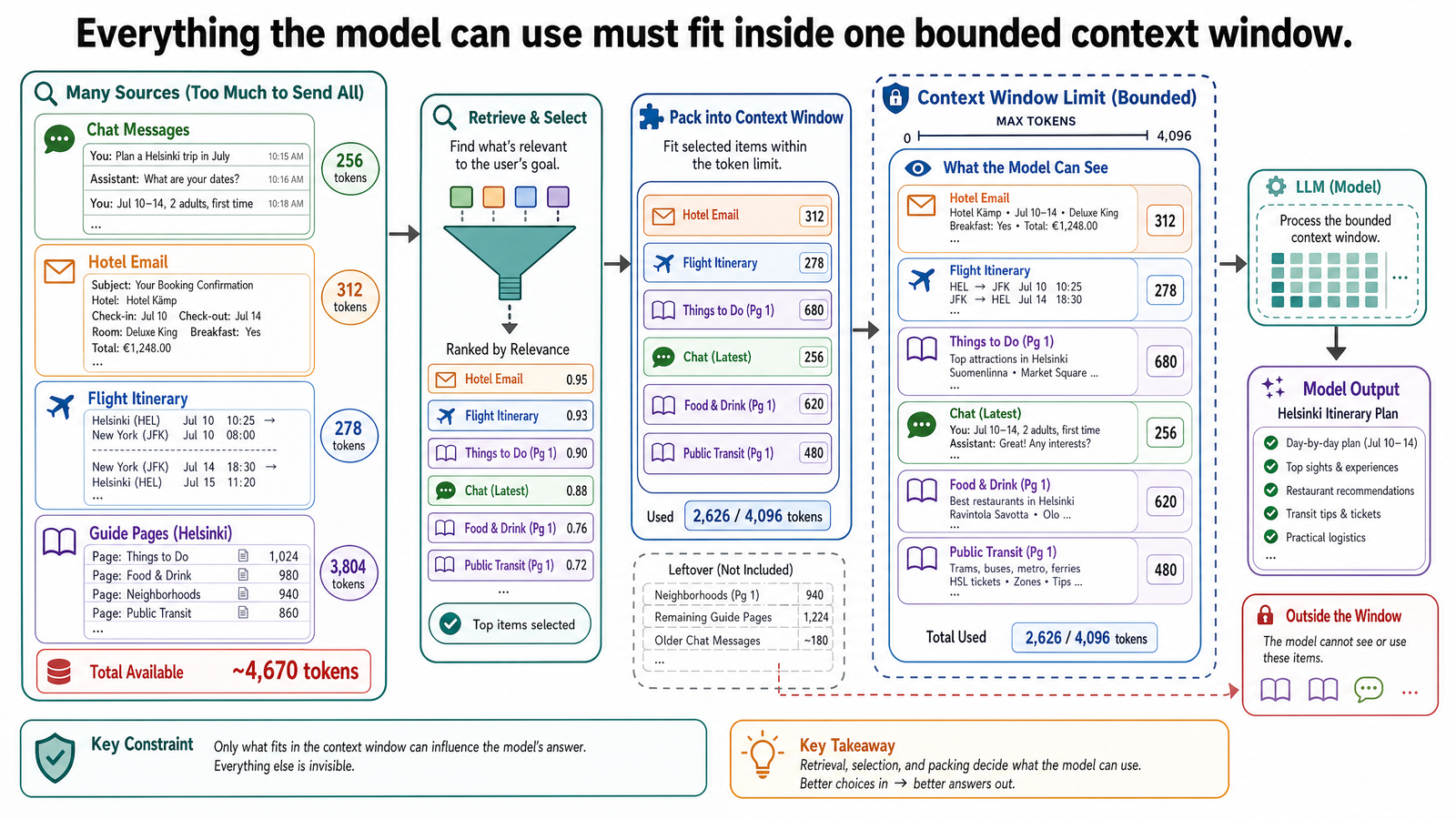
Table of Contents
- The Same Model, Two Different Inputs
- What a Prompt Is
- System Prompts and User Prompts
- Prompt Engineering: Structured Communication
- Few-Shot Prompting: Teaching by Example
- Chain-of-Thought Prompting: Requesting Step-by-Step Reasoning
- The Context Window: The Model's Working Memory
- Tokens: How Context Is Measured
- What Happens When the Context Fills Up
- Temperature: Why Outputs Vary
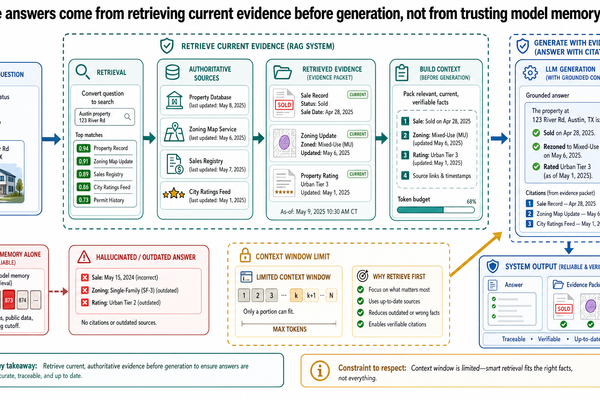
- The Wall: What Even Perfect Prompting Cannot Fix
- Common Misconceptions
- Misconception: A longer prompt is always a better prompt
- Misconception: The model "remembers" your earlier conversation
- Misconception: Chain-of-thought means the model is "thinking"
- Misconception: Temperature zero gives the "correct" answer
- What This Post Is Not
- Where This Goes Next
- Sources and Further Reading
In the previous post, we sent a single line to an LLM — "Plan a trip to Helsinki" — and got back an itinerary full of specific-sounding details: restaurant names, transit directions, day-trip logistics. It was fluent and plausible, but several of those details turned out to be wrong. The model was not broken. The input just gave it no constraints to work with.
This post is about what happens when you communicate with a model more carefully: adding structure, constraints, examples, and reasoning instructions to your input. It is also about the hard boundary you will hit no matter how carefully you write that input — the model's finite working memory, called the context window. Understanding both sides of this equation — how to talk to an LLM well, and what even the best communication cannot fix — is the foundation for everything that follows in this series.
The running example is the same Helsinki trip. But this time, the traveler tries harder.
The Same Model, Two Different Inputs
Here is the original prompt from Post 0-1:
Plan a trip to Helsinki.
And here is what the same user sends after thinking about what they actually need:
I'm planning a 5-day trip to Helsinki in late June. My budget is roughly 120 euros per day including food and local transport but not accommodation. I'm vegetarian, I prefer walking over taxis, and I'm especially interested in Art Nouveau and Nordic Classicism architecture. I'd like at least one half-day trip to Porvoo. Three specific questions: (1) Is it practical to walk from Kallio to Suomenlinna, or should I take the ferry? (2) What is the best day of the week to visit Porvoo to avoid crowds? (3) Can you suggest a vegetarian-friendly lunch spot near Temppeliaukio Church?
The model's output changes substantially. It now organizes days around walking routes, flags the ferry requirement for Suomenlinna, clusters architecture-heavy sights together, and attempts to answer the three specific questions. It is still an LLM producing text from patterns. But the patterns it draws on are now guided by meaningful constraints.
The difference is not intelligence on one side and stupidity on the other. The model did not get smarter between the two requests. It received more useful input.
What a Prompt Is
A prompt is the text input you send to a language model. It is everything the model sees before it starts generating a response. In practice, a prompt can range from a single sentence to thousands of words of structured instructions, constraints, and examples.
The important thing to understand is that the prompt is the model's entire world for that request. Unlike a human colleague who can infer your preferences from past conversations, shared context, and organizational knowledge, the model only knows what the prompt contains. If your budget constraint is not in the prompt, the model does not know about it. If your dietary restriction is not stated, it will not be respected. The model is not being careless. It simply has no other source of information.
This is why prompt quality matters as an engineering concern, not just a writing exercise. The prompt is the interface between your intent and the model's behavior.
System Prompts and User Prompts
Most LLM applications separate the prompt into two layers.
A system prompt (sometimes called a system message) sets the model's role, constraints, and behavioral rules. It is typically written by the developer or application designer, not the end user. For example:
You are a travel planning assistant. Always include estimated walking times between locations. Always include per-day budget estimates. When suggesting restaurants, note whether they have vegetarian options. If you are unsure about a factual claim, say so explicitly rather than guessing.
A user prompt is the actual request from the person using the application:
Plan day 3 around the Kallio neighborhood and Suomenlinna. I want to visit Suomenlinna fortress in the morning and spend the afternoon exploring Kallio on foot.
The system prompt persists across an entire conversation. The user prompt changes with each message. Together, they form the complete input the model processes for any given response. This separation matters because it allows application designers to enforce consistent behavior — budget estimates in every response, uncertainty flagged every time — without relying on the user to remember to ask for those things.
If you have used a chatbot that seems to "know" it should respond in a particular style or follow certain rules, that behavior almost certainly comes from a system prompt you never see.
Prompt Engineering: Structured Communication
Prompt engineering is the practice of deliberately structuring your input to improve the model's output. The term sounds grander than it is. In most cases, it means being specific, organized, and explicit about what you want — the same habits that make any technical communication effective.
From the Helsinki example, a few patterns emerge:
Constraints narrow the output. "Budget is 120 euros per day" eliminates fine-dining suggestions and private tour recommendations. The model has a concrete filter to apply.
Specificity invites detail. "Interested in Art Nouveau and Nordic Classicism" gives the model a reason to mention Helsinki Central Station's granite facade and Jugendstil details rather than listing generic attractions.
Direct questions get direct answers. Asking three numbered questions structures the response. The model mirrors the organization of the input.
None of this requires special syntax or insider knowledge. It requires thinking about what information the model needs to produce a useful result, and then providing it.
Few-Shot Prompting: Teaching by Example
Sometimes, explaining what you want is less effective than showing what you want. Few-shot prompting is the technique of including one or more input-output examples in the prompt so the model can match the pattern.
The name comes from a landmark 2020 paper by Brown et al. that demonstrated how GPT-3 could perform new tasks simply by being shown a few examples in the prompt, without any retraining. The "shots" are examples: zero-shot means no examples, one-shot means one, and few-shot means a handful.
For the Helsinki scenario, few-shot prompting might look like this:
Here is how I want daily itineraries formatted: Example — Stockholm Day 1: - 09:00 — Vasa Museum (allow 2 hours; tickets 190 SEK; no advance booking needed) - 11:30 — Walk to Gamla Stan (20 minutes, flat terrain) - 12:00 — Lunch at Hermans, Södermalm (vegetarian buffet; approx 155 SEK) - Day total: approximately 45 euros Now plan Helsinki Day 1 using the same format.
The model does not need to be told "include walking times" or "add prices" or "use 24-hour time." It infers the format from the example. Few-shot prompting is particularly useful when the desired output has a specific structure that is easier to demonstrate than to describe.
Chain-of-Thought Prompting: Requesting Step-by-Step Reasoning
Chain-of-thought prompting is a technique where you instruct the model to work through a problem in explicit steps before arriving at a conclusion. The method was formalized by Wei et al. in a 2022 paper that showed significant improvements on reasoning tasks when models were prompted to "think step by step."
It is important to be precise about what this is. Chain-of-thought is a prompting technique -- a way of structuring the input to elicit more deliberate intermediate work. The model is not "thinking" in the way a person does. It is generating a sequence of tokens where each step constrains what comes next, and that sequential structure can produce better results than jumping directly to an answer.
For production systems, however, you should be careful about asking for long visible reasoning traces. They can be verbose, unreliable as explanations of the model's internal process, and unsuitable for user-facing output. A better pattern is often to ask the model to perform the reasoning internally, then return the answer with a concise checklist, assumptions, evidence used, or validation summary.
For itinerary planning, a chain-of-thought prompt might look like this:
Before building the day plan, work through these steps: 1. List the top attractions in Kallio and near the waterfront relevant to Art Nouveau and Nordic Classicism. 2. Estimate how long each attraction typically takes to visit. 3. Estimate walking time between each pair of attractions. 4. Check whether the total time fits within a single day (9 AM to 6 PM). 5. Now build the schedule, and flag anything that does not fit.
The model's output now includes visible intermediate work: a list of attractions with time estimates, walking-distance calculations, and a feasibility check before the final itinerary. This can make errors easier to spot. If the model estimates 15 minutes to walk from Kallio to the Design District -- a distance of about 3 kilometers through the city center -- the mistake is visible in the work, not buried inside a confident final answer.
Chain-of-thought does not make the model smarter, and a written reasoning trace is not proof that the answer is correct. It is one prompting pattern for complex tasks. In tutorial examples, visible intermediate work can help readers debug the output; in production, concise rationales and explicit checks are usually safer than exposing a long reasoning transcript.
The Context Window: The Model's Working Memory
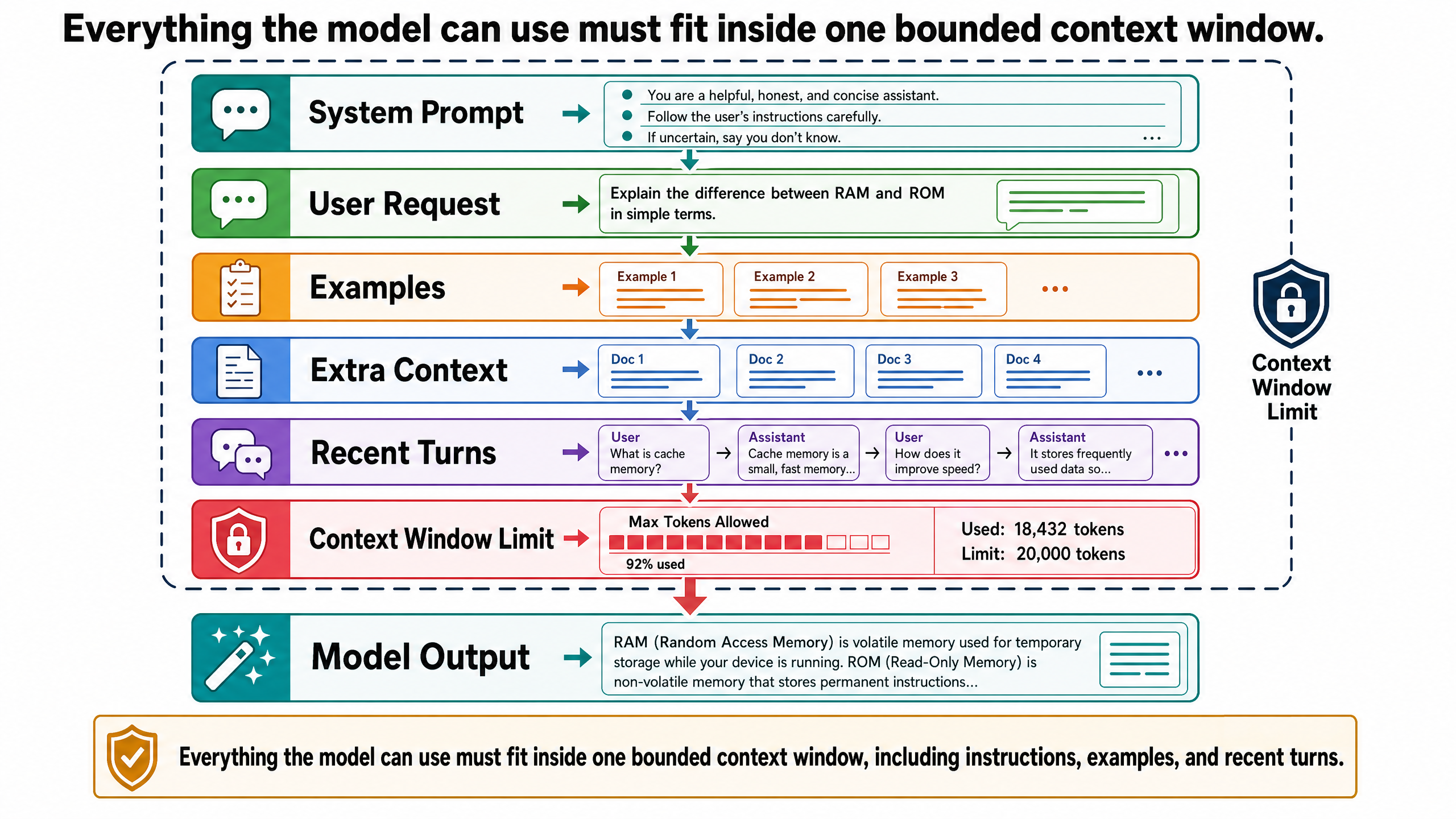
Everything discussed so far — system prompts, user messages, examples, reasoning steps — must fit inside the model's context window. This is the total amount of text the model can process at once: the input and the output combined.
Think of the context window as a fixed-size desk. Everything the model needs to work with must fit on this desk: the system prompt, the conversation history, any documents you have pasted in, and the space for the response it is generating. When the desk is full, something has to fall off.
In early large language models, context windows were small -- GPT-2 offered roughly 1,000 tokens, GPT-3 roughly 2,000, and GPT-3.5-Turbo raised that to 4,000. As of May 2026, the landscape is considerably larger:
Anthropic's Claude models such as Opus 4.6 and Sonnet 4.6 support up to 1 million tokens in the Claude API.
Google's Gemini API model table lists 1,048,576 input tokens for Gemini 2.5 Pro, Gemini 2.5 Flash, and Gemini 3 Pro Preview.
OpenAI's current frontier models such as GPT-5.5 and GPT-5.4 list roughly 1 million tokens of context in the OpenAI API model documentation.
These are large windows. A million-token context can hold roughly the equivalent of several full-length books. But "large" does not mean "unlimited," and the distinction matters in practice.
Tokens: How Context Is Measured
A token is the unit of text that a language model processes. We introduced tokens briefly in Post 0-1 as the units models predict during inference. Here, they matter as the unit of measurement for context windows and cost.
Tokens are not words. They are fragments produced by a tokenizer — the preprocessing step that breaks text into pieces the model can handle. In English, one token is roughly 0.75 words, or equivalently, one English word is roughly 1.3 tokens. The word "architecture" is two tokens. The word "Helsinki" is one or two tokens depending on the tokenizer. Punctuation, spaces, and formatting all consume tokens.
This matters for two practical reasons.
First, it determines how much fits in the context window. That 15-page Helsinki travel guide you want to paste in? At roughly 250 words per page, that is about 3,750 words, or approximately 4,900 tokens. For a model with a 200,000-token window, that is trivial. But add the system prompt (a few hundred tokens), the conversation history from an afternoon of back-and-forth planning (potentially tens of thousands of tokens), and the space needed for the model's response, and the budget tightens faster than you might expect.
Second, tokens are how providers charge for API usage. Pricing changes frequently, so treat exact numbers as provider-specific configuration rather than durable tutorial facts. The stable lesson is that input and output tokens are metered separately, and output tokens usually cost more because they are generated sequentially.
Input tokens: billed for the prompt, conversation history, retrieved documents, tool results, and other context sent to the model.
Output tokens: billed for generated text, usually at a higher rate than input tokens.
A single Helsinki itinerary request might consume 2,000 input tokens and 1,000 output tokens — fractions of a cent. But a production application serving thousands of users, each conducting multi-turn conversations with pasted documents, accumulates meaningful cost. Token counting is not a theoretical concern. It is an operational one.
What Happens When the Context Fills Up
Now return to the Helsinki traveler. The first few messages went well: a structured request, a good itinerary, some follow-up questions about Porvoo logistics. The conversation is productive.
Then the traveler pastes in a hotel confirmation email, a flight itinerary, a 15-page travel guide, and a list of restaurant recommendations from a friend. Each paste adds thousands of tokens to the conversation history.
Twenty messages later, the traveler asks: "Remember, I'm vegetarian — can you suggest dinner options near our hotel?"
The model suggests a seafood restaurant.
This is not a hallucination in the training-data sense we discussed in Post 0-1. It is a context window problem. The dietary restriction was stated in message three. By message twenty-three, with all the pasted documents in between, message three has been pushed out of the context window. The model literally does not have access to it anymore. It is not ignoring the constraint. It cannot see it.
This is the mechanical reality of context limits. The model does not have a persistent memory of your conversation. It has a fixed-size window that contains the most recent portion of the exchange. When information falls outside that window, it is gone as far as the model is concerned — silently, without warning.
Some applications mitigate this by summarizing older messages, or by extracting key facts (like dietary restrictions) and injecting them into the system prompt. But those are system-level solutions built around the model, not capabilities of the model itself. The base behavior is: if it is not in the window, it does not exist.
Temperature: Why Outputs Vary
Ask the model for restaurant recommendations near Temppeliaukio Church twice, and you may get different suggestions each time. This is not a bug. It is a consequence of how language models generate text.
As discussed in Post 0-1, an LLM predicts the next token by computing a probability distribution over its entire vocabulary. The word "traditional" might have a 12% probability of being next, "popular" might have 9%, and "excellent" might have 6%. The model does not always pick the single most probable token. It samples from this distribution, which introduces variation.
Temperature is the parameter that controls how much variation occurs. Technically, it scales the logits (raw scores) before they are passed through the softmax function that converts them into probabilities. A lower temperature (closer to 0) sharpens the distribution, making the most probable tokens overwhelmingly likely to be selected. A higher temperature (closer to 1 or above) flattens the distribution, giving lower-probability tokens a better chance of being chosen.
In practical terms:
Low temperature (0.0-0.3): The model is more deterministic and repetitive. Good for tasks where consistency and accuracy matter, like extracting structured data or answering factual questions.
Medium temperature (0.4-0.7): A balance between consistency and variety. Suitable for most general tasks.
High temperature (0.8-1.0+): The model is more creative and unpredictable. Useful for brainstorming or generating diverse options, but more likely to produce unexpected or incoherent output.
For travel recommendations, a moderate temperature is reasonable — you want variety across suggestions, but not hallucinated restaurant names. For extracting dates from the hotel confirmation email, you want temperature near zero. The task determines the right setting.
Most end users never touch the temperature parameter directly. Application developers set it based on the task. But understanding that it exists explains a common source of confusion: "I asked the same question and got a different answer." That is the model working as designed, not malfunctioning.
The Wall: What Even Perfect Prompting Cannot Fix
The Helsinki traveler has now learned to write structured prompts, provide examples, request step-by-step reasoning, and manage context carefully. The itinerary is far better than the generic one from Post 0-1. But certain problems remain stubbornly unsolved:
"Is Temppeliaukio Church open this Thursday?" The model cannot check current opening hours. Its training data has a cutoff, and it has no way to access a live website.
"What is the current bus schedule from Kamppi to Porvoo?" The model cannot look up today's schedule. It can tell you that buses run frequently from Kamppi Bus Station, but it cannot confirm specific departure times.
"Book me a table at that vegetarian restaurant for 7 PM." The model cannot interact with external systems. It has no ability to make reservations, send emails, or access booking platforms.
"Is my hotel confirmation number correct?" The model can read the confirmation email if it is in the context window, but it cannot verify the number against the hotel's actual system.
These are not failures of prompting. No amount of restructuring, examples, or chain-of-thought instructions will give the model the ability to access live data, verify facts against external systems, or take actions in the real world. These are architectural limitations of a single model operating on a static context.
This distinction is critical because it tells you where to direct your effort. If the output is vague or poorly structured, better prompting can help. If the output requires real-time information, external verification, or interaction with other systems, better prompting cannot help. The problem is not how you are talking to the model. The problem is that the model, by itself, does not have the capabilities the task requires.
Common Misconceptions
Misconception: A longer prompt is always a better prompt
Adding more text to a prompt is only useful if that text is relevant and well-structured. Pasting an entire travel guide when you only need information about Porvoo wastes tokens, increases cost, and can actually degrade output quality. Models can get "distracted" by irrelevant context, giving weight to information that does not apply to the question. Concise, targeted prompts often outperform verbose ones.
Misconception: The model "remembers" your earlier conversation
It does not have memory. It has a context window that contains the recent history of the conversation. If that history exceeds the window, older messages are dropped. What feels like memory is actually the system re-reading the conversation transcript each time — and that transcript has a size limit.
Misconception: Chain-of-thought means the model is "thinking"
Chain-of-thought prompting produces text that looks like reasoning. But the model is generating tokens sequentially based on probability distributions, not engaging in deliberation. The technique works because generating intermediate steps constrains subsequent generation in useful ways. It is a prompting strategy, not evidence of cognition.
Misconception: Temperature zero gives the "correct" answer
A temperature of zero makes the model deterministic — it will always pick the most probable next token. But the most probable token is not necessarily the correct one. If the model's training data contains errors, or if the correct answer was underrepresented in training, a temperature-zero response will be consistently and deterministically wrong. Temperature controls variation, not accuracy.
What This Post Is Not
This post is not about how to build systems that overcome the limitations described above. Retrieval-augmented generation (RAG), tool use, external data access, and grounding are all architectural solutions to the problems identified in the final section. Those belong in Post 0-3.
This post is also not about fine-tuning, reinforcement learning from human feedback (RLHF), or other techniques for modifying the model itself. The focus here is strictly on what you can accomplish through the interface between you and a fixed model: the prompt, the context window, and the generation settings.
Where This Goes Next
Better prompting got us a better itinerary — dramatically better, in fact. Structure, constraints, examples, and explicit reasoning instructions made the same model substantially more useful. But the model still cannot verify facts, access live data, or cite its sources. Those are not prompting problems. They are architectural problems.
The next post explains how systems address those gaps: by connecting models to external knowledge through retrieval, giving them access to tools, and grounding their outputs in verifiable evidence. The model remains central, but it stops being the entire application.
What happens next -- two paths. The main series continues with Post 00-3, exploring why LLMs need grounding. Alternatively, the Infrastructure Track starts here: it traces what happens to your prompt after you send it -- how the inference engine processes your tokens on the GPU, manages memory, and schedules concurrent requests.
Sources and Further Reading
Brown, T. B., Mann, B., Ryder, N., Subbiah, M., et al. (2020). "Language Models are Few-Shot Learners." *Advances in Neural Information Processing Systems 33 (NeurIPS 2020)*. The paper that demonstrated few-shot prompting with GPT-3, showing that large language models could perform new tasks from a handful of in-context examples without retraining. arXiv:2005.14165
Wei, J., Wang, X., Schuurmans, D., Bosma, M., et al. (2022). "Chain-of-Thought Prompting Elicits Reasoning in Large Language Models." *Advances in Neural Information Processing Systems 35 (NeurIPS 2022)*. Introduced chain-of-thought prompting and demonstrated that asking models to generate intermediate reasoning steps significantly improves performance on arithmetic, commonsense, and symbolic reasoning tasks. arXiv:2201.11903
Anthropic. (2026). "1M context is now generally available for Opus 4.6 and Sonnet 4.6." Documents the 1 million token context window for current Claude API models. claude.com/blog/1m-context-ga
OpenAI. "Models." Current OpenAI API model reference for context-window and model-capability information. developers.openai.com/api/docs/models
Google AI for Developers. "Gemini models." Current Gemini API model reference for input and output token limits. ai.google.dev/gemini-api/docs/models
Schulhoff, S., Ilie, M., Balepur, N., et al. (2024). "The Prompt Report: A Systematic Survey of Prompting Techniques." A comprehensive survey of prompting methods including few-shot, chain-of-thought, and their variants. arXiv:2406.06608
Huang Tzu Lin
With over five years in autonomous robotics, there's a strong passion for incorporating cutting-edge technologies and innovative approaches. Dedicated to transforming the latest research and insights into practical applications, this journey pushes the limits of possibility.
Related Posts
Stay Updated
Get the latest technical insights delivered to your inbox.